
Usage Stats
Product Designer
Web Data Extraction
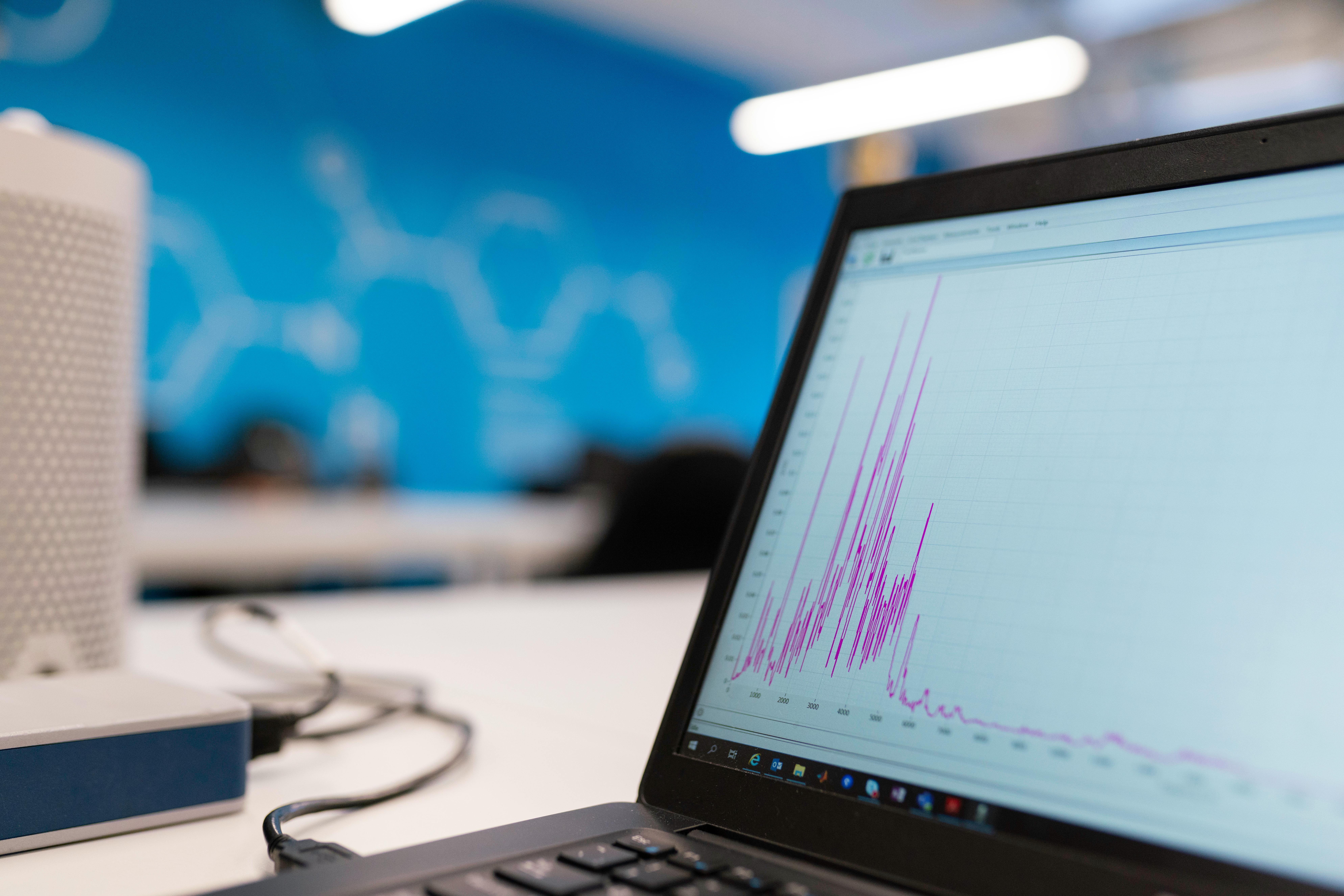
Data only matters if you can make sense of it. Zyte's team had tons of info on requests, costs, outputs, and features, but there was no quick way to see what was happening. We put together a dashboard that makes all those numbers actually useful. You can open it, take a quick look, and instantly get what’s going on.
Usage Stats
Product Designer
Web Data Extraction
Data only matters if you can make sense of it. Zyte's team had tons of info on requests, costs, outputs, and features, but there was no quick way to see what was happening. We put together a dashboard that makes all those numbers actually useful. You can open it, take a quick look, and instantly get what’s going on.
Usage Stats
Product Designer
Web Data Extraction
Zyte is the original and best web data extraction platform. I designed a dashboard for web extraction engineers and developers to understand their usage and requests through data visualization.
Usage Stats
Product Designer
Web Data Extraction
Data only matters if you can make sense of it. Zyte's team had tons of info on requests, costs, outputs, and features, but there was no quick way to see what was happening. We put together a dashboard that makes all those numbers actually useful. You can open it, take a quick look, and instantly get what’s going on.
3
Chart types designed
Multi
Filter dimensions
Figma
Primary tool
2022
Year
3
Chart types designed
Multi
Filter dimensions
Figma
Primary tool
2022
Year
3
Chart types designed
Multi
Filter dimensions
Figma
Primary tool
2022
Year
Challenge
Too Much Data, Not Enough Clarity
Dashboards are tricky, not because you need to cram in more features, but because you have to decide what to leave out. In this case, we had a big, complex dataset, and our users were pretty technical. They needed to be able to look at the data from different angles, depending on what they were trying to figure out.
Challenge
Too Much Data, Not Enough Clarity
Dashboards are tricky, not because you need to cram in more features, but because you have to decide what to leave out. In this case, we had a big, complex dataset, and our users were pretty technical. They needed to be able to look at the data from different angles, depending on what they were trying to figure out.
Challenge
Too Much Data, Not Enough Clarity
Dashboards are tricky, not because you need to cram in more features, but because you have to decide what to leave out. In this case, we had a big, complex dataset, and our users were pretty technical. They needed to be able to look at the data from different angles, depending on what they were trying to figure out.
Challenge
Too Much Data, Not Enough Clarity
Dashboards are tricky, not because you need to cram in more features, but because you have to decide what to leave out. In this case, we had a big, complex dataset, and our users were pretty technical. They needed to be able to look at the data from different angles, depending on what they were trying to figure out.
DESIGN PROCESS
How I Approached This Project
01
Competitive review
I looked at a bunch of dashboard patterns to figure out which conventions actually make sense to keep.
02
Tech Lead collaboration
Before jumping into design, I mapped out what the data could actually do.
03
Data viz research
Chose chart types based on function, not aesthetics.
04
Gestalt and iterate
Applied visual principles and refined through feedback rounds.
DESIGN PROCESS
How I Approached This Project
01
Competitive review
I looked at a bunch of dashboard patterns to figure out which conventions actually make sense to keep.
02
Tech Lead collaboration
Before jumping into design, I mapped out what the data could actually do.
03
Data viz research
Chose chart types based on function, not aesthetics.
04
Gestalt and iterate
Applied visual principles and refined through feedback rounds.
DESIGN PROCESS
How I Approached This Project
01
Competitive review
I looked at a bunch of dashboard patterns to figure out which conventions actually make sense to keep.
02
Tech Lead collaboration
Before jumping into design, I mapped out what the data could actually do.
03
Data viz research
Chose chart types based on function, not aesthetics.
04
Gestalt and iterate
Applied visual principles and refined through feedback rounds.
DESIGN PROCESS
How I Approached This Project
01
Competitive review
I looked at a bunch of dashboard patterns to figure out which conventions actually make sense to keep.
02
Tech Lead collaboration
Before jumping into design, I mapped out what the data could actually do.
03
Data viz research
Chose chart types based on function, not aesthetics.
04
Gestalt and iterate
Applied visual principles and refined through feedback rounds.
RESEARCH
Understanding the Landscape
Before jumping into design, I checked out a bunch of dashboards and competitor products to see what was already out there. I wanted to know what engineers were used to, what patterns made sense to keep, and where there were gaps we could actually fix.
I wasn't looking to copy anyone. I just wanted to make sure I wasn't reinventing the wheel and to spot patterns users already understood.
Users scan before they read
Put the key info up top. Visual hierarchy should make the important stuff pop first.
Context switching kills focus
Engineers want everything in one spot, not scattered across different screens.
Filters need to feel intuitive
Multi-select should just make sense right away, no walkthrough needed.
Data constraints shape design
Just because it looks great in Figma doesn't mean it's possible in the backend. Figure out the constraints early.
RESEARCH
Understanding the Landscape
Before jumping into design, I checked out a bunch of dashboards and competitor products to see what was already out there. I wanted to know what engineers were used to, what patterns made sense to keep, and where there were gaps we could actually fix.
I wasn't looking to copy anyone. I just wanted to make sure I wasn't reinventing the wheel and to spot patterns users already understood.
Users scan before they read
Put the key info up top. Visual hierarchy should make the important stuff pop first.
Context switching kills focus
Engineers want everything in one spot, not scattered across different screens.
Filters need to feel intuitive
Multi-select should just make sense right away, no walkthrough needed.
Data constraints shape design
Just because it looks great in Figma doesn't mean it's possible in the backend. Figure out the constraints early.
RESEARCH
Understanding the Landscape
Before jumping into design, I checked out a bunch of dashboards and competitor products to see what was already out there. I wanted to know what engineers were used to, what patterns made sense to keep, and where there were gaps we could actually fix.
I wasn't looking to copy anyone. I just wanted to make sure I wasn't reinventing the wheel and to spot patterns users already understood.
Users scan before they read
Put the key info up top. Visual hierarchy should make the important stuff pop first.
Context switching kills focus
Engineers want everything in one spot, not scattered across different screens.
Filters need to feel intuitive
Multi-select should just make sense right away, no walkthrough needed.
Data constraints shape design
Just because it looks great in Figma doesn't mean it's possible in the backend. Figure out the constraints early.
RESEARCH
Understanding the Landscape
Before jumping into design, I checked out a bunch of dashboards and competitor products to see what was already out there. I wanted to know what engineers were used to, what patterns made sense to keep, and where there were gaps we could actually fix.
I wasn't looking to copy anyone. I just wanted to make sure I wasn't reinventing the wheel and to spot patterns users already understood.
Users scan before they read
Put the key info up top. Visual hierarchy should make the important stuff pop first.
Context switching kills focus
Engineers want everything in one spot, not scattered across different screens.
Filters need to feel intuitive
Multi-select should just make sense right away, no walkthrough needed.
Data constraints shape design
Just because it looks great in Figma doesn't mean it's possible in the backend. Figure out the constraints early.
Collaborating With the Tech Lead
Dashboards live or die by their data. Early on, I teamed up with our Tech Lead to figure out what data we actually had, what we could show, what needed backend work, and what just wasn't possible.
Those chats saved me from designing stuff that looked cool in Figma but couldn't ship. By knowing the data limits up front, every design choice stayed grounded in reality.
Research
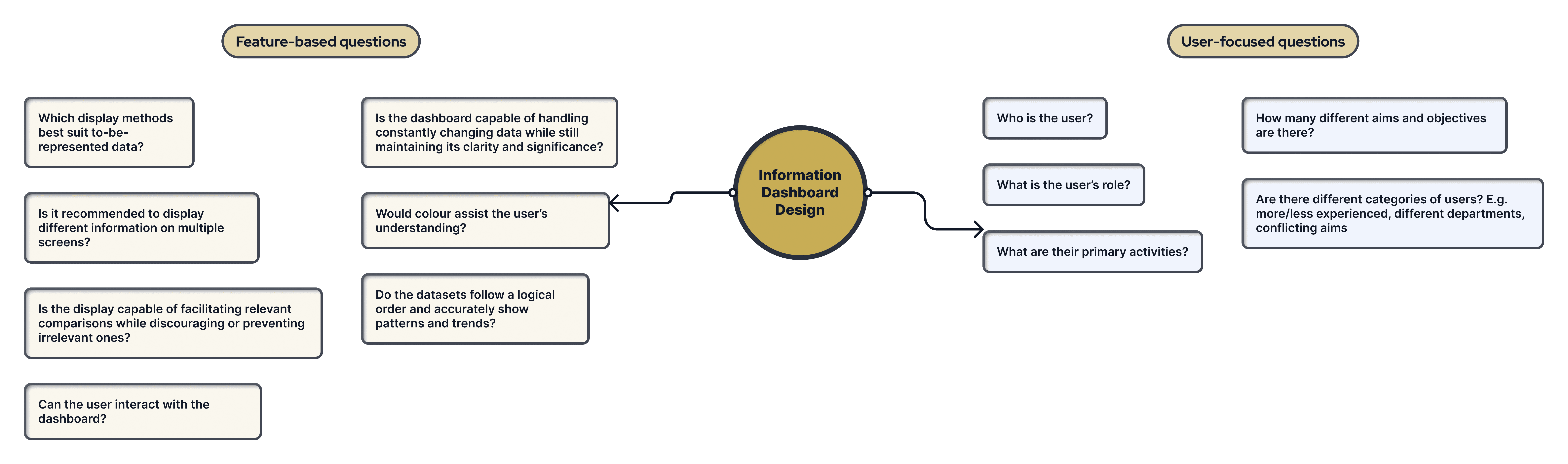
Feature-based and user-focused questions combined to uncover both what users needed and why they needed it.
Collaborating With the Tech Lead
Dashboards live or die by their data. Early on, I teamed up with our Tech Lead to figure out what data we actually had, what we could show, what needed backend work, and what just wasn't possible.
Those chats saved me from designing stuff that looked cool in Figma but couldn't ship. By knowing the data limits up front, every design choice stayed grounded in reality.
Research
Feature-based and user-focused questions combined to uncover both what users needed and why they needed it.
Collaborating With the Tech Lead
Dashboards live or die by their data. Early on, I teamed up with our Tech Lead to figure out what data we actually had, what we could show, what needed backend work, and what just wasn't possible.
Those chats saved me from designing stuff that looked cool in Figma but couldn't ship. By knowing the data limits up front, every design choice stayed grounded in reality.
Collaborating With the Tech Lead
Dashboards live or die by their data. Early on, I teamed up with our Tech Lead to figure out what data we actually had, what we could show, what needed backend work, and what just wasn't possible.
Those chats saved me from designing stuff that looked cool in Figma but couldn't ship. By knowing the data limits up front, every design choice stayed grounded in reality.
Research
Feature-based and user-focused questions combined to uncover both what users needed and why they needed it.
Design Solutions
Gestalt Principles in Practice
After wrapping up research, I used Gestalt principles across the interface to help users read and interact with the data.
I used the law of similarity to design the filter bar, making buttons, dropdowns, and inputs look like they belong together. That way, users can scan the toolbar quickly without reading every label. I also grouped related controls using proximity, so the layout shows the hierarchy right away. Colour isn't just for looks here; each cost type has its own colour, so users know what they're seeing before they even read the labels.

Filter UI
We used the Gestalt law of similarity to group buttons, dropdowns, and inputs together, so users can scan the UI quickly without having to read every label. We used colour to show different cost types, so users can tell what they're looking at right away, even before reading any labels. Multi-select filters make it easy for engineers to check status, output, features, and metrics all at the same time.
Design Solutions
Gestalt Principles in Practice
After wrapping up research, I used Gestalt principles across the interface to help users read and interact with the data.
I used the law of similarity to design the filter bar, making buttons, dropdowns, and inputs look like they belong together. That way, users can scan the toolbar quickly without reading every label. I also grouped related controls using proximity, so the layout shows the hierarchy right away. Colour isn't just for looks here; each cost type has its own colour, so users know what they're seeing before they even read the labels.
Filter UI
We used the Gestalt law of similarity to group buttons, dropdowns, and inputs together, so users can scan the UI quickly without having to read every label. We used colour to show different cost types, so users can tell what they're looking at right away, even before reading any labels. Multi-select filters make it easy for engineers to check status, output, features, and metrics all at the same time.
Design Solutions
Gestalt Principles in Practice
After wrapping up research, I used Gestalt principles across the interface to help users read and interact with the data.
I used the law of similarity to design the filter bar, making buttons, dropdowns, and inputs look like they belong together. That way, users can scan the toolbar quickly without reading every label. I also grouped related controls using proximity, so the layout shows the hierarchy right away. Colour isn't just for looks here; each cost type has its own colour, so users know what they're seeing before they even read the labels.
Filter UI
We used the Gestalt law of similarity to group buttons, dropdowns, and inputs together, so users can scan the UI quickly without having to read every label. We used colour to show different cost types, so users can tell what they're looking at right away, even before reading any labels. Multi-select filters make it easy for engineers to check status, output, features, and metrics all at the same time.
Design Solutions
Gestalt Principles in Practice
After wrapping up research, I used Gestalt principles across the interface to help users read and interact with the data.
I used the law of similarity to design the filter bar, making buttons, dropdowns, and inputs look like they belong together. That way, users can scan the toolbar quickly without reading every label. I also grouped related controls using proximity, so the layout shows the hierarchy right away. Colour isn't just for looks here; each cost type has its own colour, so users know what they're seeing before they even read the labels.
Filter UI
We used the Gestalt law of similarity to group buttons, dropdowns, and inputs together, so users can scan the UI quickly without having to read every label. We used colour to show different cost types, so users can tell what they're looking at right away, even before reading any labels. Multi-select filters make it easy for engineers to check status, output, features, and metrics all at the same time.
Design Solutions
Choosing the Right Chart Types
Every chart type on the dashboard was a deliberate decision.
Bar Graphs
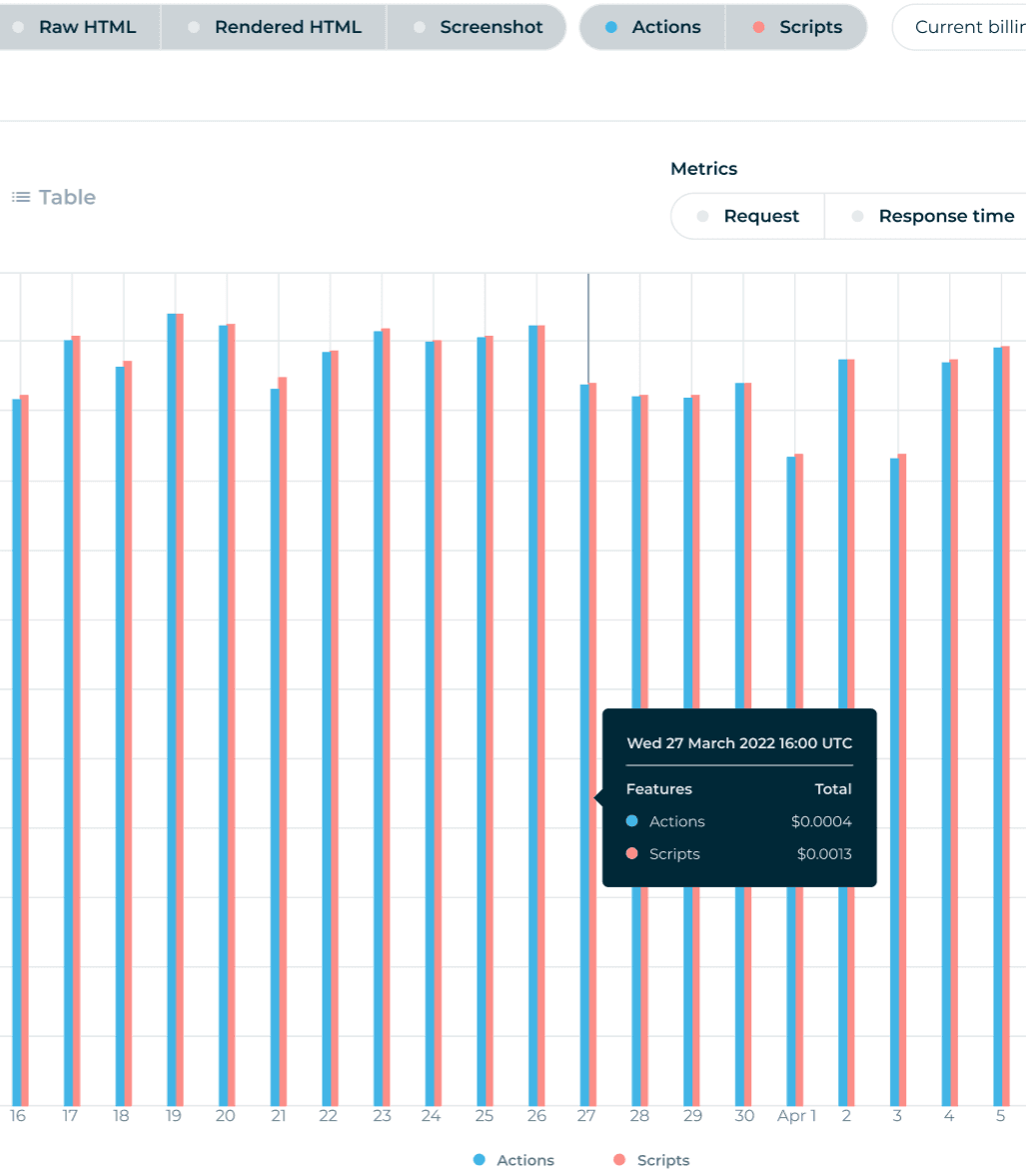
High contrast colours let engineers gauge relative values instantly. No mental math required.
Line Charts
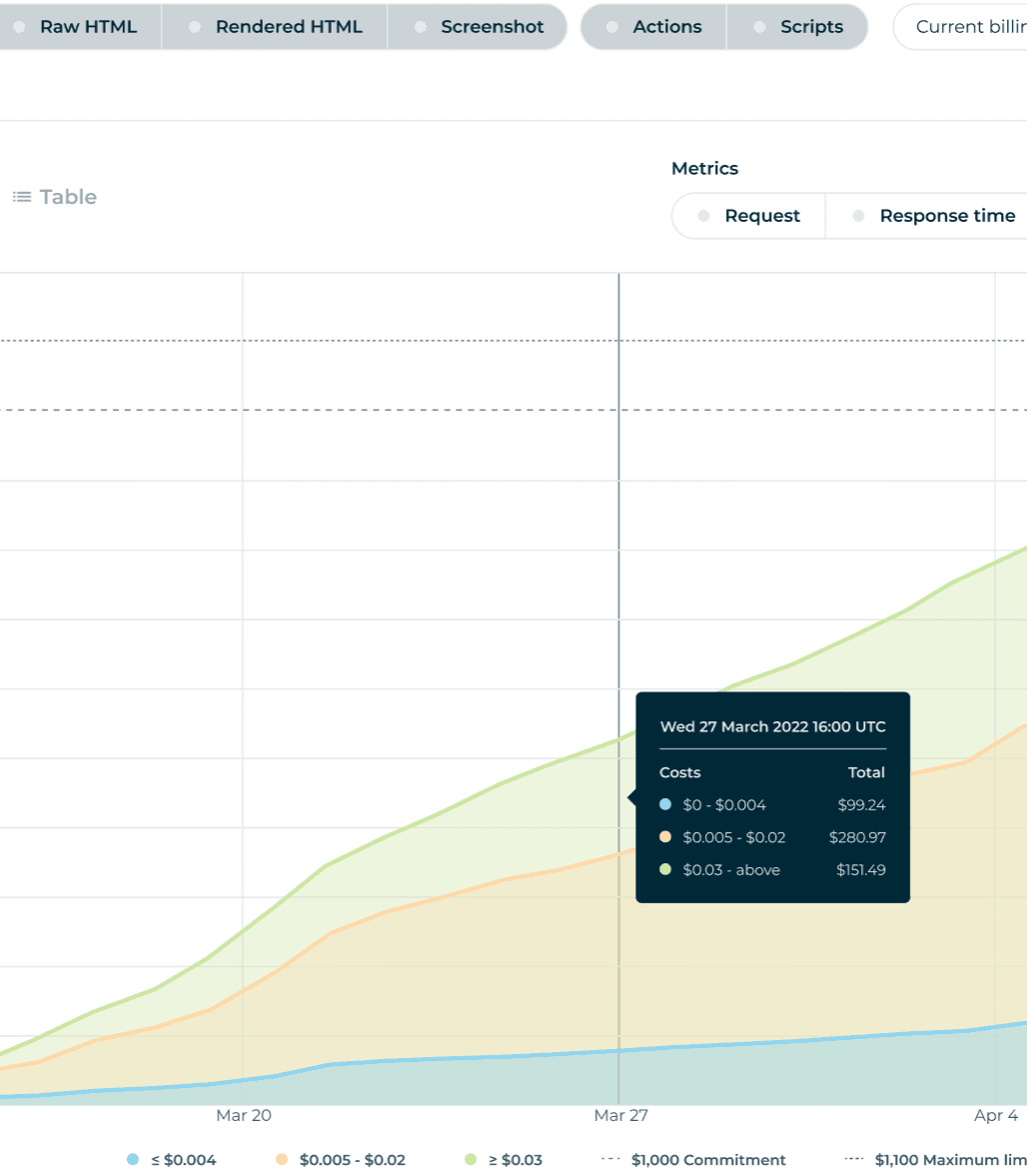
The connected line makes trends over time obvious in a way a bar chart simply cannot.
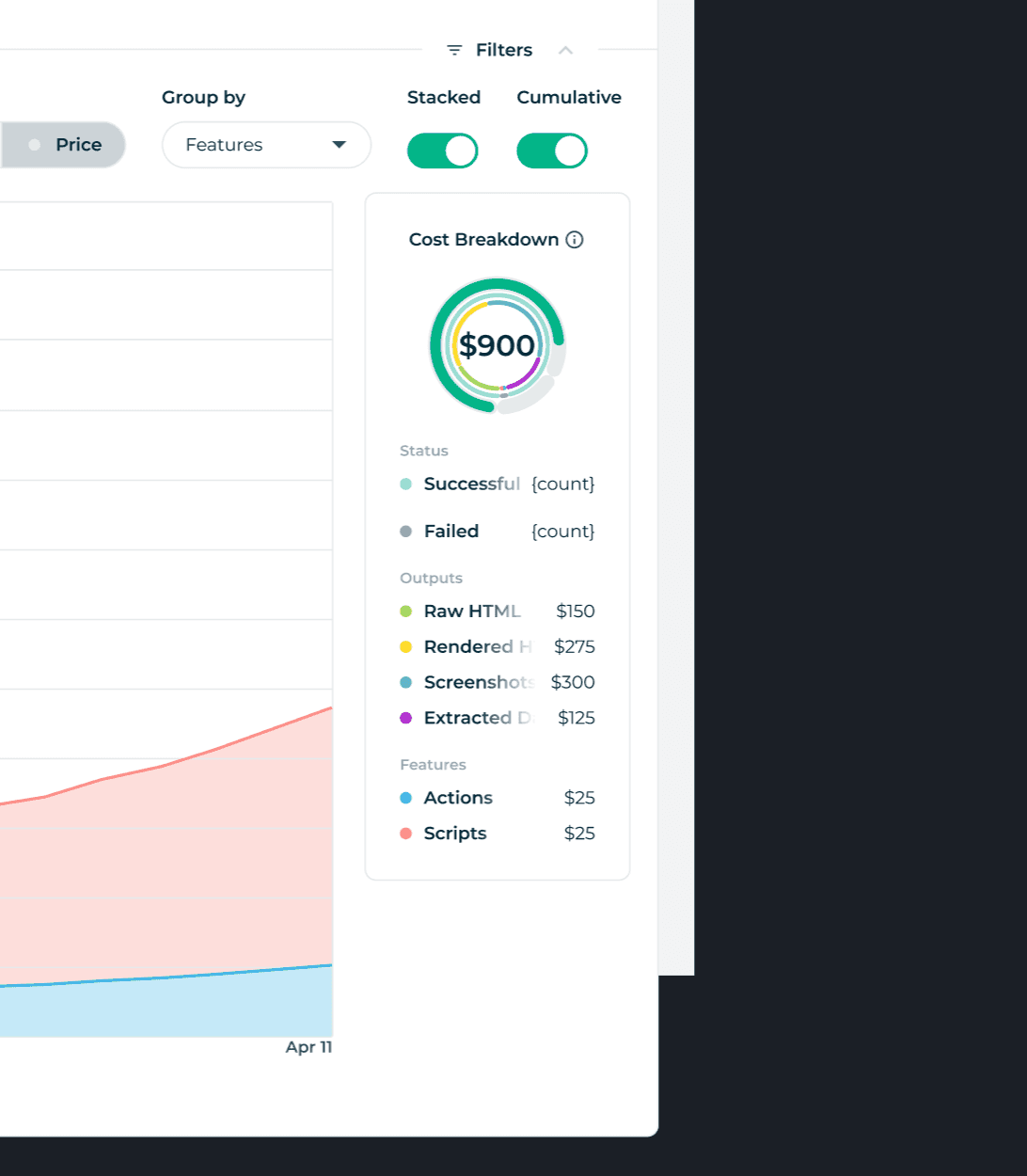
Circular Charts
People are drawn to circles. Used intentionally for an at-a-glance sense of aggregate data.
Design Solutions
Choosing the Right Chart Types
Every chart type on the dashboard was a deliberate decision.
Bar Graphs
High contrast colours let engineers gauge relative values instantly. No mental math required.
Line Charts
The connected line makes trends over time obvious in a way a bar chart simply cannot.
Circular Charts
People are drawn to circles. Used intentionally for an at-a-glance sense of aggregate data.
Design Solutions
Choosing the Right Chart Types
Every chart type on the dashboard was a deliberate decision.
Bar Graphs
High contrast colours let engineers gauge relative values instantly. No mental math required.
Line Charts
The connected line makes trends over time obvious in a way a bar chart simply cannot.
Circular Charts
People are drawn to circles. Used intentionally for an at-a-glance sense of aggregate data.
Design Solutions
Choosing the Right Chart Types
Every chart type on the dashboard was a deliberate decision.
Bar Graphs
High contrast colours let engineers gauge relative values instantly. No mental math required.
Line Charts
The connected line makes trends over time obvious in a way a bar chart simply cannot.
Circular Charts
People are drawn to circles. Used intentionally for an at-a-glance sense of aggregate data.
Design Solutions
Filter Logic – Letting Users Ask Their Own Questions
The filter system was probably the trickiest part of the project. Engineers had to juggle a bunch of dimensions at once, such as status, output, features, metrics, and cost and watch the results update live. One toggle with two totally different views. Non-cumulative mode lets you see what happened at each point in time, which is great for catching spikes or drops. Cumulative mode gives you the running total, so you can track growth over time. It’s a small control, but it really changes how you read the data.
The table view lives right next to the charts for when you need to dig into the details, row by row. Not everything makes sense as a chart. Sometimes you just want to see the raw data.
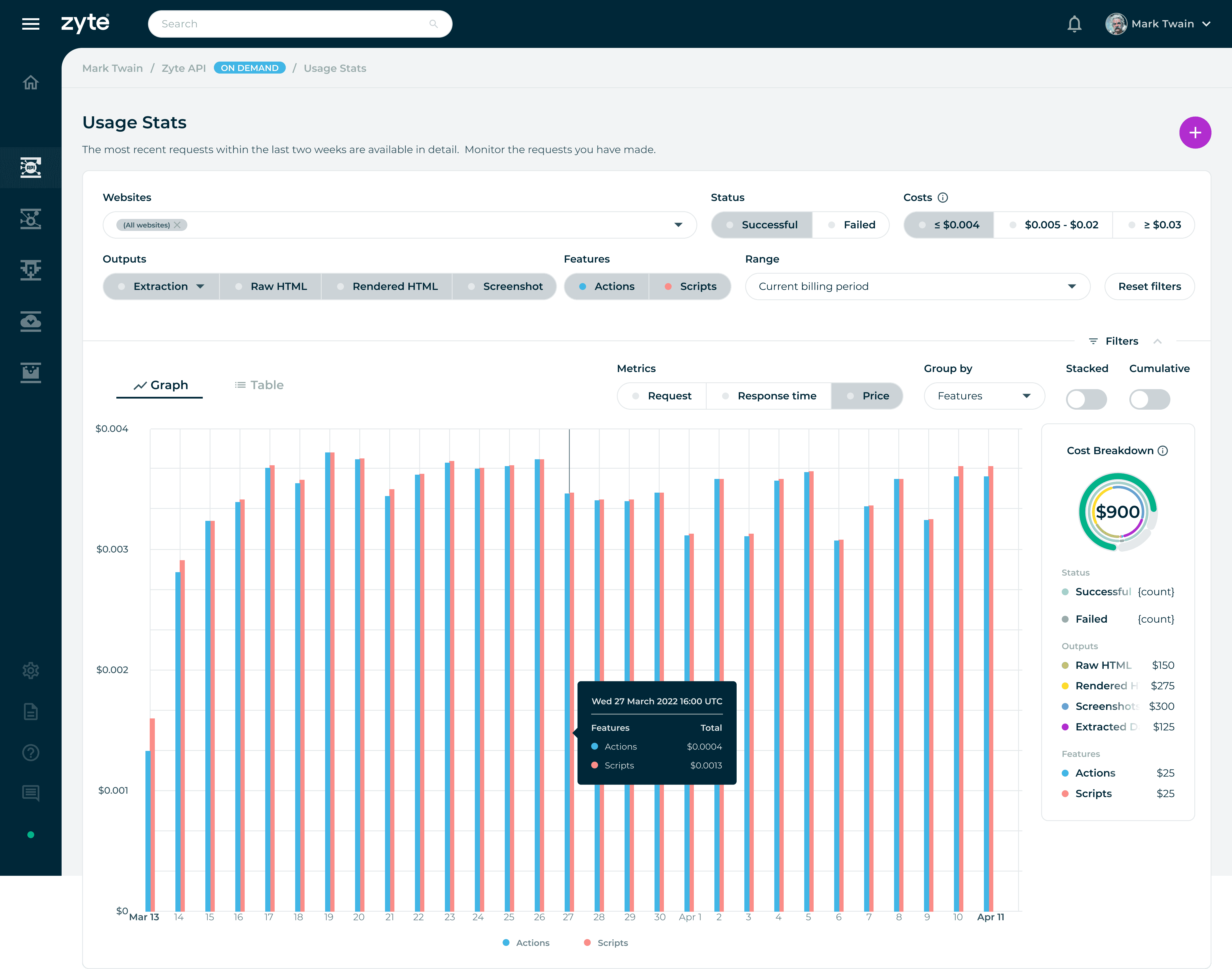
Toggle
Non-cumulative mode shows what happened at each moment in time. Useful for spotting a spike or a drop.
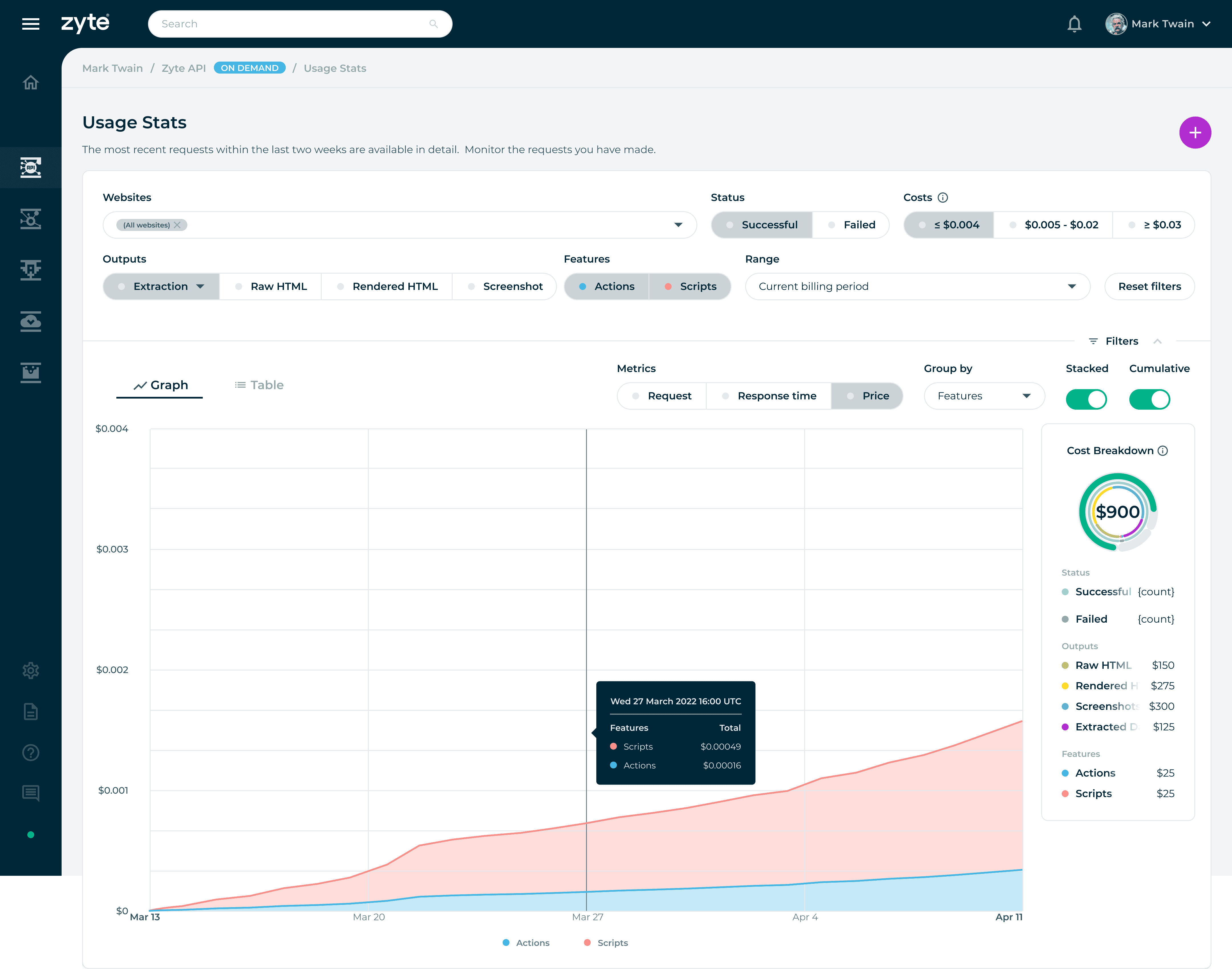
Filter Logic
Successful outputs, Actions and Scripts enabled, at or under $0.004 per request. A specific question, a specific answer.
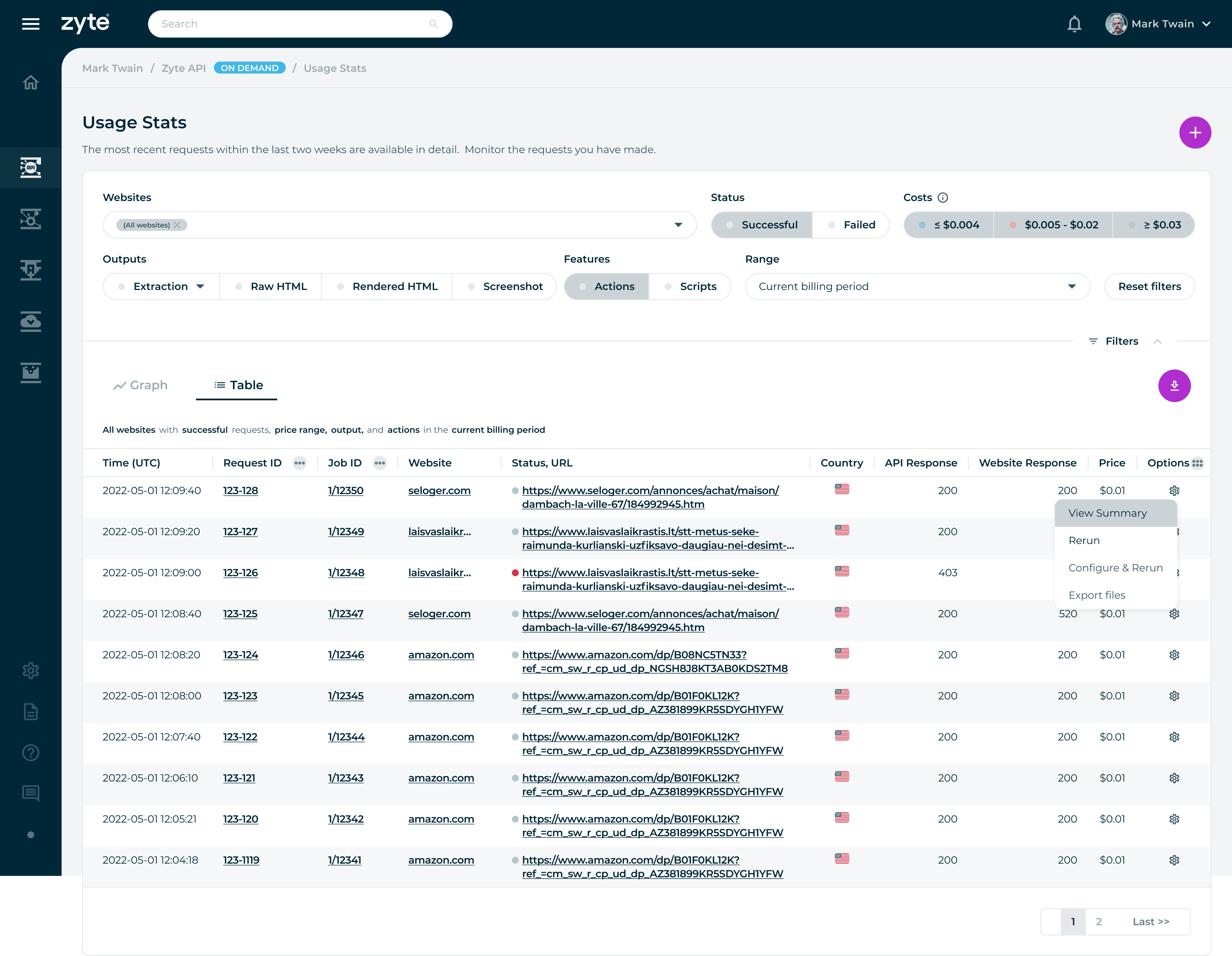
Table View
Granular row-by-row detail for when engineers need to investigate a specific request. Not everything belongs in a chart.
Design Solutions
Filter Logic – Letting Users Ask Their Own Questions
The filter system was probably the trickiest part of the project. Engineers had to juggle a bunch of dimensions at once, such as status, output, features, metrics, and cost and watch the results update live. One toggle with two totally different views. Non-cumulative mode lets you see what happened at each point in time, which is great for catching spikes or drops. Cumulative mode gives you the running total, so you can track growth over time. It’s a small control, but it really changes how you read the data.
The table view lives right next to the charts for when you need to dig into the details, row by row. Not everything makes sense as a chart. Sometimes you just want to see the raw data.
Toggle
Non-cumulative mode shows what happened at each moment in time. Useful for spotting a spike or a drop.
Filter Logic
Successful outputs, Actions and Scripts enabled, at or under $0.004 per request. A specific question, a specific answer.
Table View
Granular row-by-row detail for when engineers need to investigate a specific request. Not everything belongs in a chart.
Design Solutions
Filter Logic – Letting Users Ask Their Own Questions
The filter system was probably the trickiest part of the project. Engineers had to juggle a bunch of dimensions at once, such as status, output, features, metrics, and cost and watch the results update live. One toggle with two totally different views. Non-cumulative mode lets you see what happened at each point in time, which is great for catching spikes or drops. Cumulative mode gives you the running total, so you can track growth over time. It’s a small control, but it really changes how you read the data.
The table view lives right next to the charts for when you need to dig into the details, row by row. Not everything makes sense as a chart. Sometimes you just want to see the raw data.
Toggle
Non-cumulative mode shows what happened at each moment in time. Useful for spotting a spike or a drop.
Filter Logic
Successful outputs, Actions and Scripts enabled, at or under $0.004 per request. A specific question, a specific answer.
Table View
Granular row-by-row detail for when engineers need to investigate a specific request. Not everything belongs in a chart.
Design Solutions
Filter Logic – Letting Users Ask Their Own Questions
The filter system was probably the trickiest part of the project. Engineers had to juggle a bunch of dimensions at once, such as status, output, features, metrics, and cost and watch the results update live. One toggle with two totally different views. Non-cumulative mode lets you see what happened at each point in time, which is great for catching spikes or drops. Cumulative mode gives you the running total, so you can track growth over time. It’s a small control, but it really changes how you read the data.
The table view lives right next to the charts for when you need to dig into the details, row by row. Not everything makes sense as a chart. Sometimes you just want to see the raw data.
Toggle
Non-cumulative mode shows what happened at each moment in time. Useful for spotting a spike or a drop.
Filter Logic
Successful outputs, Actions and Scripts enabled, at or under $0.004 per request. A specific question, a specific answer.
Table View
Granular row-by-row detail for when engineers need to investigate a specific request. Not everything belongs in a chart.
Iteration
Feedback and Refinement
We ran the dashboard by the Tech Lead and devs a few times before it started to click. At first, there were way too many controls on the screen. Stuff that made sense to me just confused the people actually using the data.
With each round, we cleaned up the layout, made the filters simpler, and made sure the default view was actually useful right away. The goal: open the dashboard, see what's going on, and do something about it. Anything that slowed that down got cut or moved.
Iteration
Feedback and Refinement
We ran the dashboard by the Tech Lead and devs a few times before it started to click. At first, there were way too many controls on the screen. Stuff that made sense to me just confused the people actually using the data.
With each round, we cleaned up the layout, made the filters simpler, and made sure the default view was actually useful right away. The goal: open the dashboard, see what's going on, and do something about it. Anything that slowed that down got cut or moved.
Iteration
Feedback and Refinement
We ran the dashboard by the Tech Lead and devs a few times before it started to click. At first, there were way too many controls on the screen. Stuff that made sense to me just confused the people actually using the data.
With each round, we cleaned up the layout, made the filters simpler, and made sure the default view was actually useful right away. The goal: open the dashboard, see what's going on, and do something about it. Anything that slowed that down got cut or moved.
Iteration
Feedback and Refinement
We ran the dashboard by the Tech Lead and devs a few times before it started to click. At first, there were way too many controls on the screen. Stuff that made sense to me just confused the people actually using the data.
With each round, we cleaned up the layout, made the filters simpler, and made sure the default view was actually useful right away. The goal: open the dashboard, see what's going on, and do something about it. Anything that slowed that down got cut or moved.
Conclusion
From Data to Decisions
Designing dashboards made me realize that less is more. Every filter, chart, and label is a choice, and if you add too much, you just make things harder for users. I worked closely with the Tech Lead and devs to really dig into the data before jumping into design. The best UI choices came out of those chats. Understanding what the data could actually do meant I wasn't just designing blindly.
In the end, we built a tool that technical users could trust, because it matched how they actually work, not just what looks cool on a dashboard.
01
Restraint matters. I try to cut anything that doesn't help the user get what they need right now.
02
I always dig into the data before jumping into design. Constraints aren't roadblocks; they're basically the brief.
03
Stuff like Gestalt isn't just for looks. These visual principles actually help people process info faster.
04
Working with others always leads to better data products. My best design ideas usually come out of chats with the Tech Lead, not when I'm working solo.
Conclusion
From Data to Decisions
Designing dashboards made me realize that less is more. Every filter, chart, and label is a choice, and if you add too much, you just make things harder for users. I worked closely with the Tech Lead and devs to really dig into the data before jumping into design. The best UI choices came out of those chats. Understanding what the data could actually do meant I wasn't just designing blindly.
In the end, we built a tool that technical users could trust, because it matched how they actually work, not just what looks cool on a dashboard.
01
Restraint matters. I try to cut anything that doesn't help the user get what they need right now.
02
I always dig into the data before jumping into design. Constraints aren't roadblocks; they're basically the brief.
03
Stuff like Gestalt isn't just for looks. These visual principles actually help people process info faster.
04
Working with others always leads to better data products. My best design ideas usually come out of chats with the Tech Lead, not when I'm working solo.
Conclusion
From Data to Decisions
Designing dashboards made me realize that less is more. Every filter, chart, and label is a choice, and if you add too much, you just make things harder for users. I worked closely with the Tech Lead and devs to really dig into the data before jumping into design. The best UI choices came out of those chats. Understanding what the data could actually do meant I wasn't just designing blindly.
Restraint matters. I try to cut anything that doesn't help the user get what they need right now.
I always dig into the data before jumping into design. Constraints aren't roadblocks; they're basically the brief.
Stuff like Gestalt isn't just for looks. These visual principles actually help people process info faster.
Working with others always leads to better data products. My best design ideas usually come out of chats with the Tech Lead, not when I'm working solo.
Conclusion
From Data to Decisions
Designing dashboards made me realize that less is more. Every filter, chart, and label is a choice, and if you add too much, you just make things harder for users. I worked closely with the Tech Lead and devs to really dig into the data before jumping into design. The best UI choices came out of those chats. Understanding what the data could actually do meant I wasn't just designing blindly.
In the end, we built a tool that technical users could trust, because it matched how they actually work, not just what looks cool on a dashboard.
Restraint matters. I try to cut anything that doesn't help the user get what they need right now.
I always dig into the data before jumping into design. Constraints aren't roadblocks; they're basically the brief.
Stuff like Gestalt isn't just for looks. These visual principles actually help people process info faster.
Working with others always leads to better data products. My best design ideas usually come out of chats with the Tech Lead, not when I'm working solo.